Staffing driven by sales
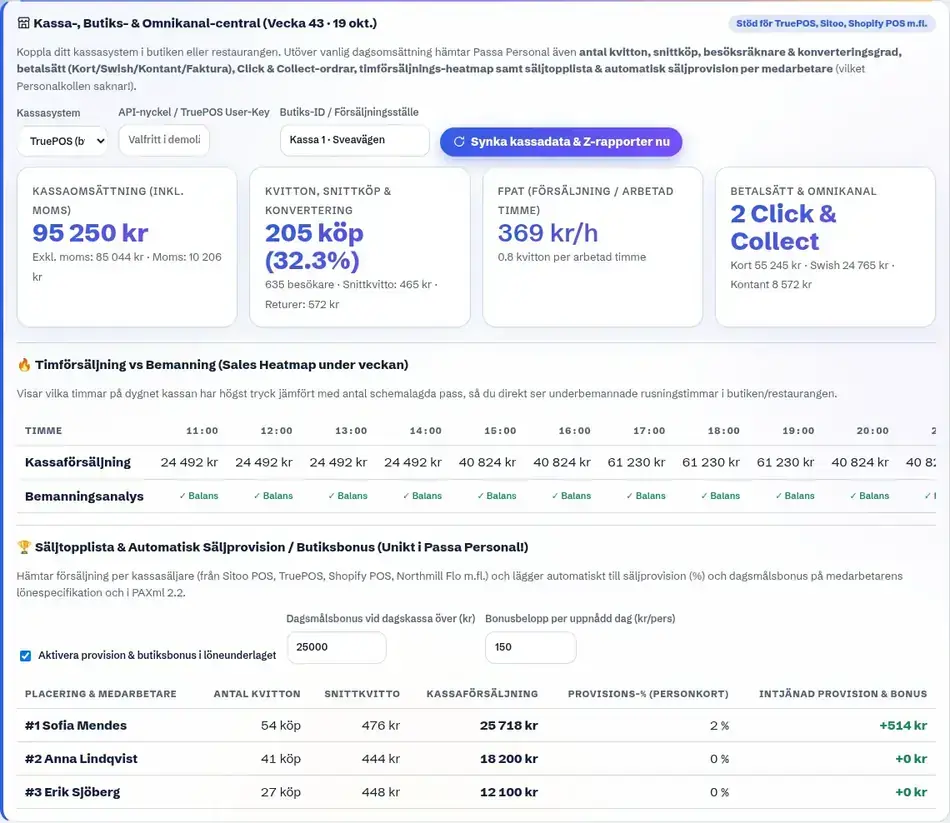
Sales per worked hour shown right in the schedule.
Schedule staff based on sales, not guesswork. Connect the till and see what each worked hour actually costs and earns.
What everyday life looks like at most shops. Before Passa.
In retail, staffing is driven by when customers actually arrive. A quiet Tuesday and the Saturday before payday need completely different cover. But the schedule often looks the same both days, because that is how it has always looked. The result is either people standing around with nothing to do, or a queue at the till.
By connecting the till, Passa Personal sees sales hour by hour and puts it straight next to staffing in the schedule. That shows where you are overstaffed and where you are short-handed. Handels premiums are calculated automatically, and the payroll data goes as PAXml or SIE4 to Fortnox or Visma. Staffing is then proposed by the hour instead of by the day. A Wednesday with low turnover does not need the same cover as Saturday morning, and the system works that out from how it has actually looked historically. Scheduling by sales also makes the budget easier to defend: you can show exactly what an extra hour at the till returned.
How everyday life usually changes when the schedule stops being an evening project.
Sales per worked hour shown right in the schedule.
Evening, weekend and overtime supplements under the agreement, per hour.
The same data goes to Fortnox or Visma as PAXml or SIE4.
Everything in one system, without add-ons that show up on the invoice.
Opening, closing and prep time for each weekday. Done in five minutes.
The system builds the whole week from staffing needs, skills and the Swedish Working Hours Act.
Staff clock in. At the end of the period the payroll data is ready to export.
TruePOS, Sitoo, Shopify POS, Zettle and Onslip. With more on the way. If your till is missing you can import sales by file instead.
Supplements are calculated per hour under the Handels agreement, based on when in the day the shift falls. No counting afterwards.
Yes. Sales and staff cost sit side by side per hour, so you see straight away whether a shift paid for itself.
No. Passa reads sales from the system you already have, through an integration or a file import.
Yes. The schedule can have different cover for different hours of the day, based on how sales actually look.
See the whole overview. What is the same and what differs.
Read more →Evening premiums, tips and staff ledger. And a stand-in mid-service.
Read more →A small team should not need a big system. Schedule done in minutes.
Read more →Reception, housekeeping and kitchen in one schedule. With daily rest tracked.
Read more →Same system, different industry: staff scheduling for restaurants · staff scheduling for cafés · staff scheduling for hotels. See the live example with your own logo.
20 minutes, no obligations. We show the system with your opening hours.
Book a demo – 20 minutes